
Revenue growth without hiring more people sounds like one of those promises that’s too good to be true. But here’s the reality: businesses that have systematically implemented AI-powered automation are seeing exactly that kind of lift. Not through magical thinking—through eliminating the administrative sludge that eats up significant portions of the average employee’s workday. According to a 2023 Asana report, knowledge workers spend 57% of their time on “work about work”—communicating about tasks, searching for information, managing administrative duties—rather than skilled, strategic work that actually generates money.
We’ve built custom software and automation solutions for hundreds of small and medium-sized businesses since ChatGPT launched in 2022. The pattern we see over and over: companies that methodically automate their operational bottlenecks free up enough capacity that their current staff can handle substantially more revenue-generating work. The impact varies by business and implementation, but when done right, the gains are significant.
This isn’t about replacing your team with robots. Eighty-seven percent of businesses using AI report that the technology augments their workforce rather than displacing it. What we’re talking about is giving your people the tools to work at their actual skill level instead of spending half their day on data entry and email management.
Key Takeaways
- Administrative Time Drain: Knowledge workers spend 57% of their time on “work about work”—communicating about tasks, searching for information, and managing administrative duties—rather than revenue-generating strategic work, according to a 2023 Asana report.
- Workforce Augmentation Reality: 87% of businesses using AI report the technology augments their workforce rather than displacing it, with growing businesses that adopt AI often increasing hiring as efficiency gains create new roles and scaling opportunities.
- Lead Qualification Impact: AI-powered lead scoring tools can increase qualified leads by up to 67% by analyzing behavioral and demographic data in real-time, allowing sales teams to focus on high-value prospects instead of manual qualification tasks.
- Productivity Gains Documented: Studies from MIT and Stanford show generative AI delivers 14% to over 50% productivity gains for specific tasks, with National Bureau of Economic Research finding AI saves employees up to 5.4% of work hours—translating to several hours per week for 20-25% of professionals.
- Market Growth Trajectory: The global workflow automation market reached $26.5 billion in 2024 and is projected to exceed $78 billion by 2030, driven by businesses treating automation as ongoing strategic initiatives rather than one-time implementations.
How Can AI Improve Operational Efficiency for Small Businesses?
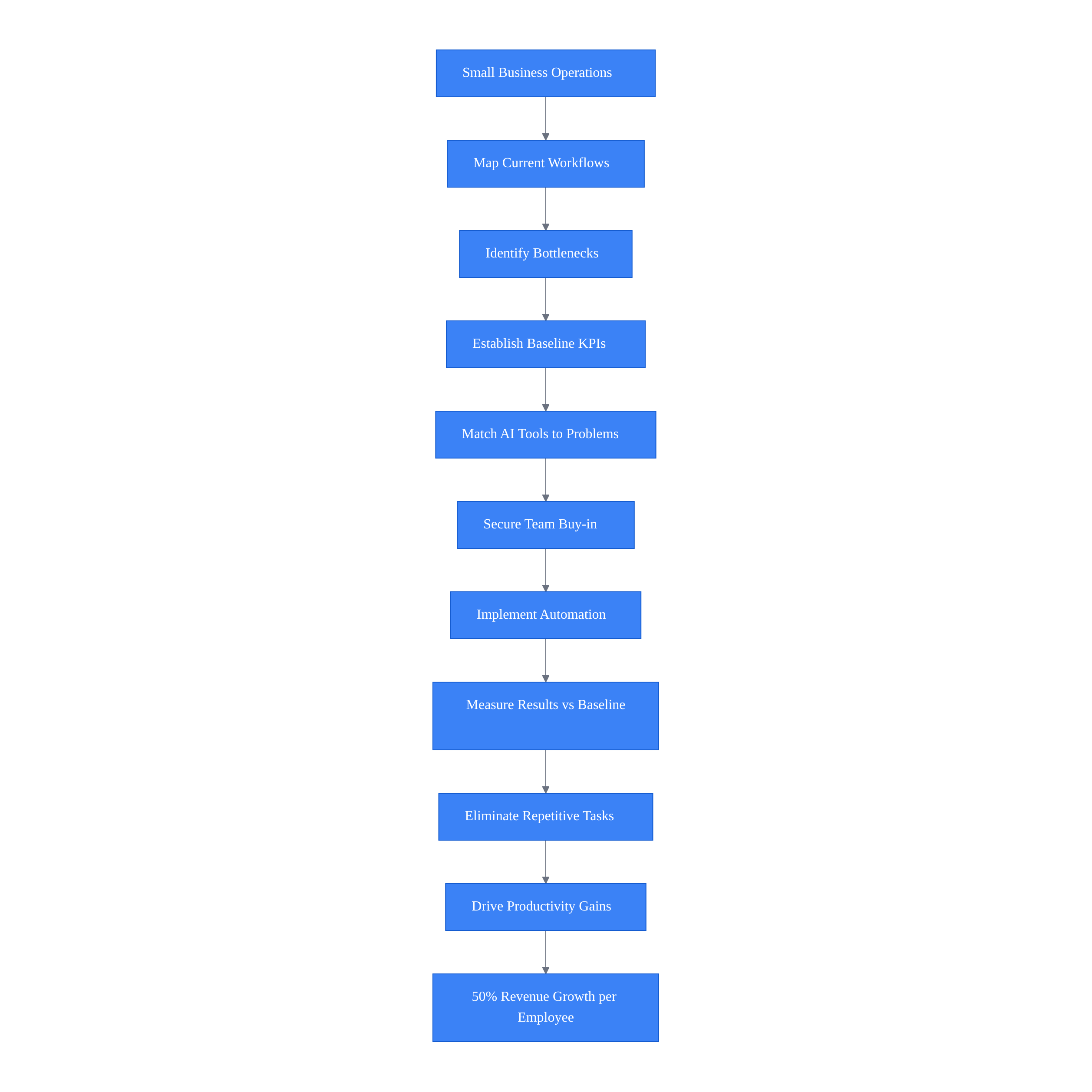
AI improves operational efficiency for small businesses by systematically identifying bottlenecks and matching automation tools to specific problems. Successful implementation requires mapping workflows, establishing baseline KPIs, securing team buy-in, and treating automation as a strategic initiative rather than just software adoption. This approach eliminates repetitive tasks employees dislike while driving measurable productivity gains.
The Disconnect Between Adoption and Results
Here’s what’s interesting: AI adoption among small to midsize businesses is growing rapidly, with usage rates doubling year-over-year in recent data. Yet most are barely scratching the surface of what’s possible. They’ve adopted a chatbot or use AI to draft social media posts, but they haven’t systematically identified where their operational bottlenecks actually are or matched the right automation tools to those specific problems.
The businesses that see dramatic revenue growth per employee are doing something different. They’re treating business process automation as a strategic initiative, not just another software subscription. They’re measuring operational efficiency KPIs before and after implementation. They’re securing team buy-in by showing employees how automation eliminates the work they hate most.
And they’re being honest about the fact that this takes real effort upfront. You need 2-3 hours to properly map your workflows and identify automation opportunities. You need baseline data to measure against. You need someone on your team willing to champion the initiative and work through the inevitable hiccups during implementation.
How to Develop a Business Process Automation (BPA) Strategy?
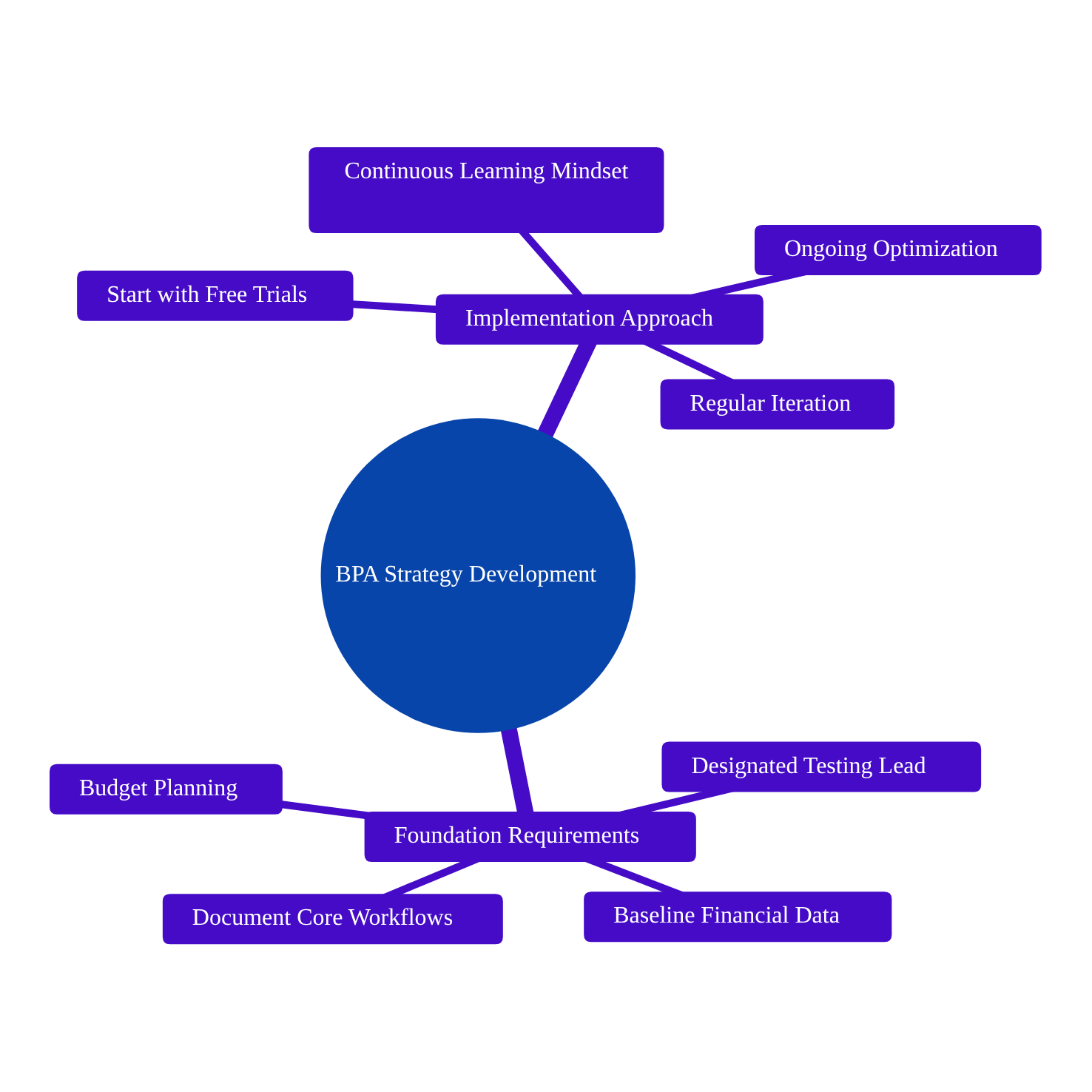
Developing a BPA strategy requires documenting core workflows, establishing baseline metrics for measurement, designating a team member to test and evaluate tools, setting a realistic budget starting with free trials, and committing to continuous learning. Successful automation depends on treating implementation as an ongoing optimization process rather than a one-time deployment, with regular iteration based on results.
What You Actually Need to Start
Before you touch a single AI tool, you need these pieces in place:
- Documented workflows for your core business processes—sales pipelines, CRM updates, customer service protocols, whatever drives your operation
- Baseline financial and operational data so you can measure what changes
- A designated team member willing to test new tools and report back honestly
- A realistic budget (starting with free trials is fine, but plan for paid tiers if something works)
- Computer, internet access, and a commitment to continuous learning
That last one matters more than people think. The businesses that fail at automation are usually the ones that implement a tool, see some initial improvement, and then stop iterating. The ones that succeed treat it as an ongoing optimization process.
Finding Your Actual Bottlenecks
The first mistake companies make is trying to automate everything at once. The second mistake is automating processes that are already broken.
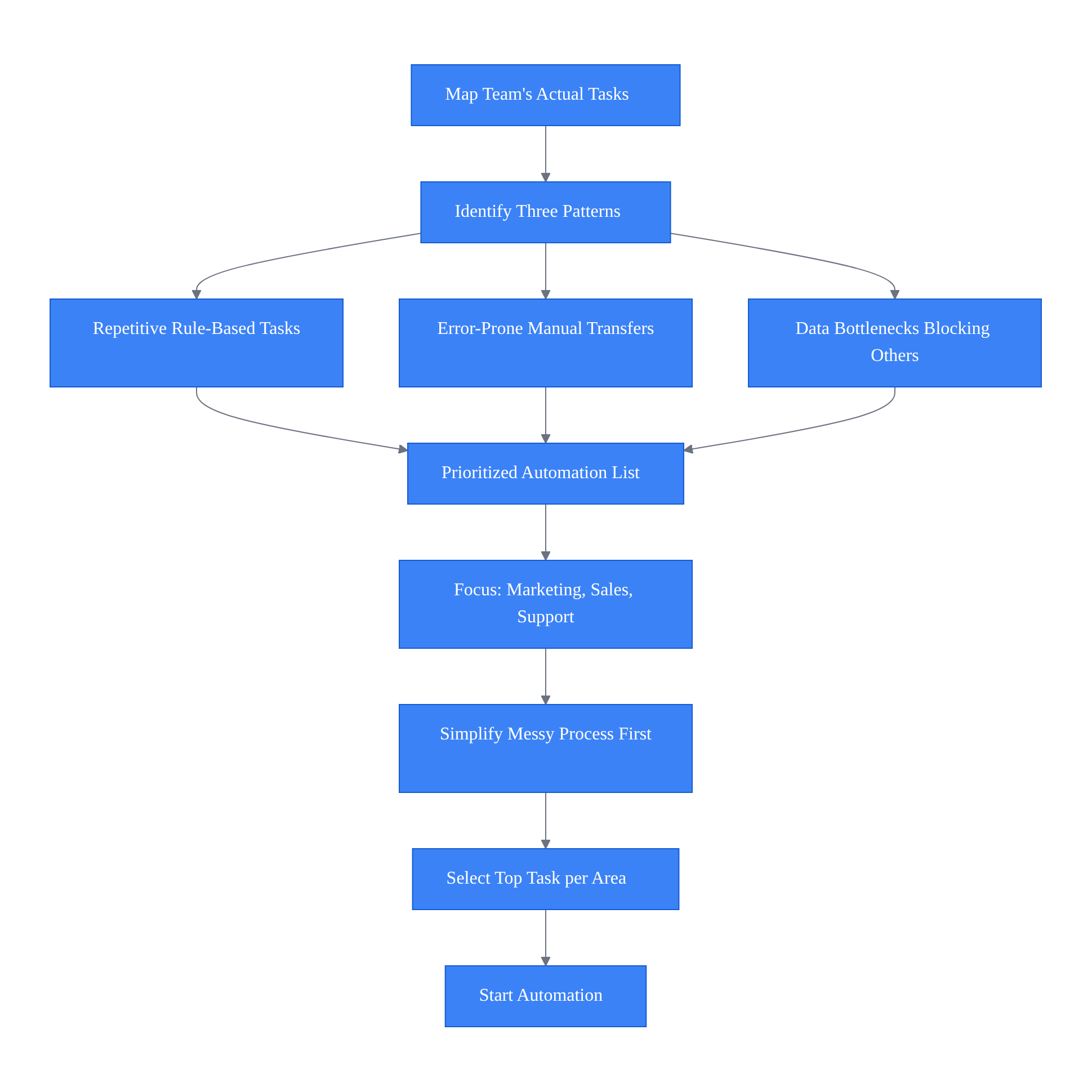
Start by mapping your team’s daily, weekly, and monthly tasks. Not what you think they do—what they actually spend time on. You’re looking for three specific patterns:
Tasks that are highly repetitive and rule-based. Data entry. Updating spreadsheets. Copying information from one system to another. Scheduling follow-ups. These are prime automation candidates because they require zero creativity or judgment.
Areas prone to human error. If your team is manually transferring lead data into your CRM and you’re constantly finding mistakes, that’s a signal. Research shows employees spend approximately 4.5 hours per week on tasks they believe could be automated, though broader studies place this number higher—often in the range of 30-40% when accounting for all administrative duties like data entry, scheduling, and managing emails. Data entry is consistently ranked as the most disliked manual task among office workers—and over 75% believe time spent on tasks that could be automated is a poor use of their skills.
Data-heavy chores that create bottlenecks for other work. If your sales team can’t follow up on leads because they’re waiting for someone to compile a report, that’s a bottleneck worth eliminating.
What you’ll end up with is a prioritized list. For most businesses, the biggest time drains fall into three categories: marketing tasks (content creation, social media, email campaigns), sales activities (lead data management, follow-up scheduling, proposal generation), and customer support (responding to common inquiries, ticket routing, documentation).
Here’s a common trap: trying to automate a complex, messy process without cleaning it up first. If your current workflow has seventeen exceptions and requires three people to make judgment calls at different stages, automating it will just create an expensive mess. Simplify the process first, then automate.
If you’re feeling overwhelmed looking at your entire operation, narrow your focus to three core areas and identify the single most time-consuming task in each. That’s your starting point.
What Are the Benefits of Implementing Business Process Automation With Agentic AI?
Business process automation with agentic AI delivers faster customer service response times, improved lead qualification with up to 67% increases in qualified leads, accelerated content creation through AI-drafted materials, and elimination of manual data entry. These benefits create substantial operational capacity by handling high-volume repetitive tasks, allowing human workers to focus on higher-value activities.
Matching AI Capabilities to Real Problems
Once you know where your bottlenecks are, you need to understand what different types of AI actually do. This is where businesses waste money—they buy impressive-sounding tools that don’t address their specific problems.
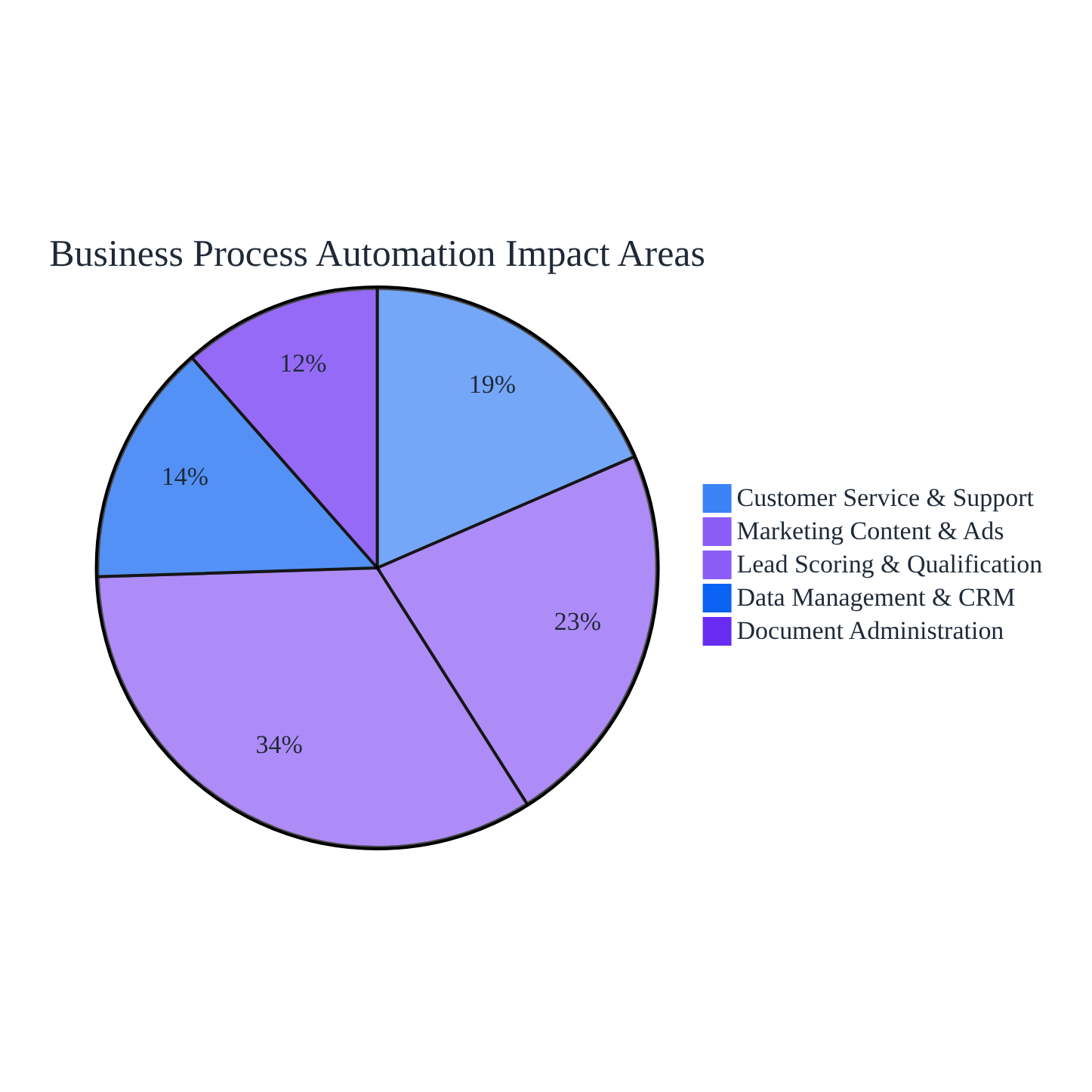
If customer service response times are your issue, you’re looking at AI chatbots or smart knowledge bases that can handle common inquiries without human intervention. Forty-five percent of small and midsize businesses use AI regularly for marketing—drafting content and customizing ads. Thirty-seven percent use it for customer service. These are the most common applications because they address high-volume, repetitive work.
For lead generation, AI-powered tools can significantly improve lead scoring and qualification, with some case studies showing increases in qualified leads of up to 67%. But that’s not magic—it’s because AI can analyze behavioral and demographic data to score leads in real-time, identifying which prospects are actually worth your sales team’s time. The actual percentage increase depends heavily on the industry, the tool’s implementation, and the quality of your underlying data.
If content creation is your bottleneck, tools like ChatGPT can draft initial versions of blog posts, email campaigns, social media updates, and even sales proposals. The key word is “initial”—AI gives you a solid first draft that a human then refines. This is augmentation, not replacement.
For data management and CRM updates, you’re looking at automation tools that can route information between systems, update records based on triggers, and eliminate manual data entry. While document management and administrative work consume a significant portion of an office worker’s day, automating even a portion of these tasks creates substantial capacity.
The mistake here is buying technology for technology’s sake. Focus strictly on tools that directly address the problems you identified in your bottleneck analysis. Start with one or two specific applications, not a comprehensive enterprise suite.
What’s the Best Way to Choose New Software Tools That My Business Will Actually Use?
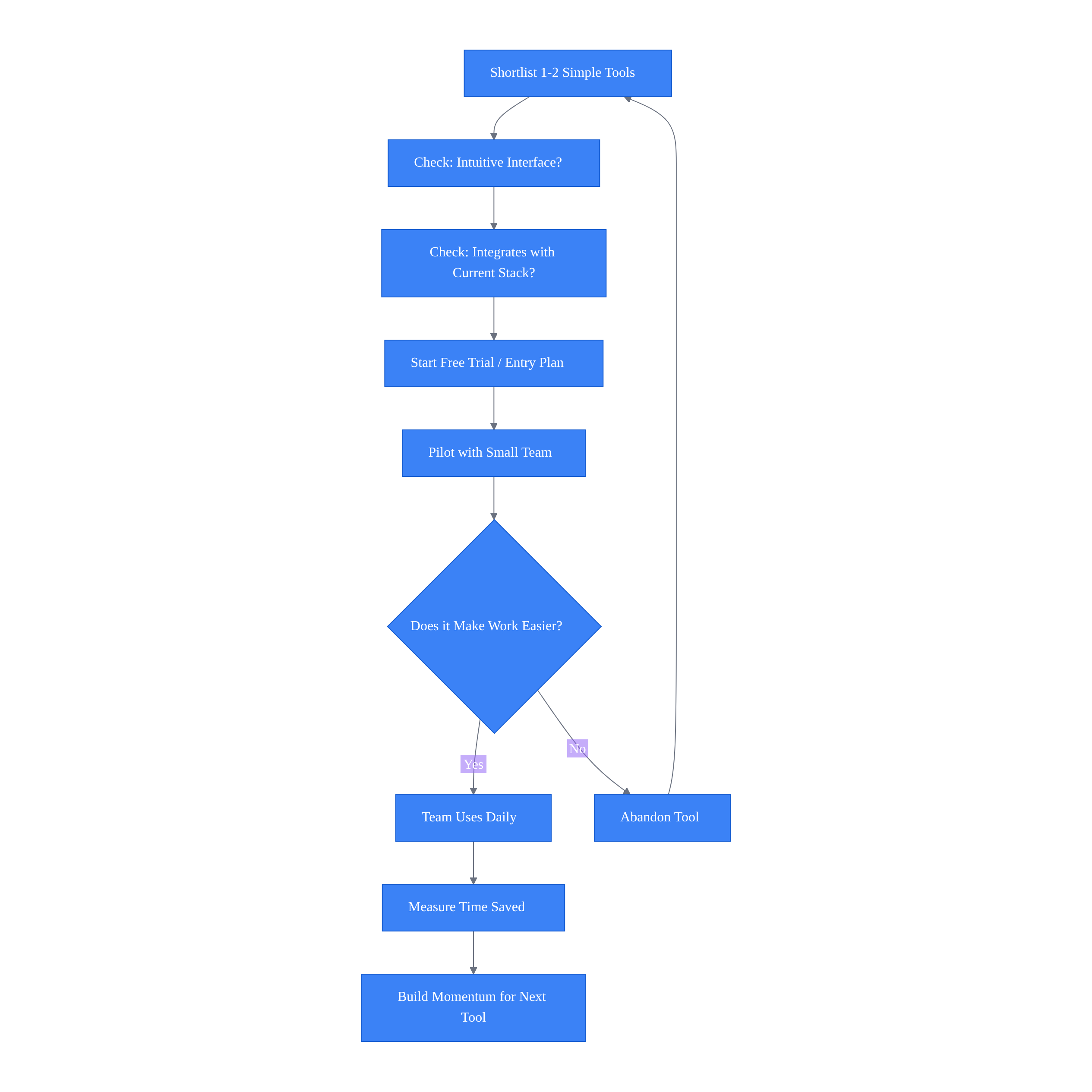
Businesses should pilot one or two simple tools using free trials, prioritizing intuitive interfaces and seamless integration with existing systems. Starting small minimizes risk and prevents team overwhelm. Success depends on whether software genuinely makes employees’ work easier, not feature complexity. Demonstrating value with one targeted automation builds momentum for future implementations.
Selecting Tools You’ll Actually Use
You want to pilot one or two simple tools from your shortlist. Prioritize software with intuitive interfaces, transparent pricing, and seamless integration with your current tech stack.
Start small. Use free trials or entry-level plans to minimize financial risk while you’re learning. The goal is to create a controlled testing environment where you can measure actual impact without betting the farm.
Here’s what happens when businesses try to overhaul everything overnight: chaos, resistance, and ultimately failure. We’ve seen it dozens of times. A company gets excited about automation, purchases five different tools, tries to implement them simultaneously, overwhelms their team, and six months later nothing is actually being used.
Success with one targeted automation builds the momentum needed for larger projects later. If you automate your email follow-up sequence and your sales team sees that it actually works and saves them time, they’ll be receptive to automating other parts of their workflow. If you try to change ten things at once, you’ll get pushback on all of them.
The technical integration matters less than you think at this stage. Most modern tools are designed to work together. What matters is whether your team will actually use the software daily. That’s determined by whether it makes their lives genuinely easier, not by how impressive the feature list looks.
What is the Impact of Automation on Employee Roles in a Small Business?
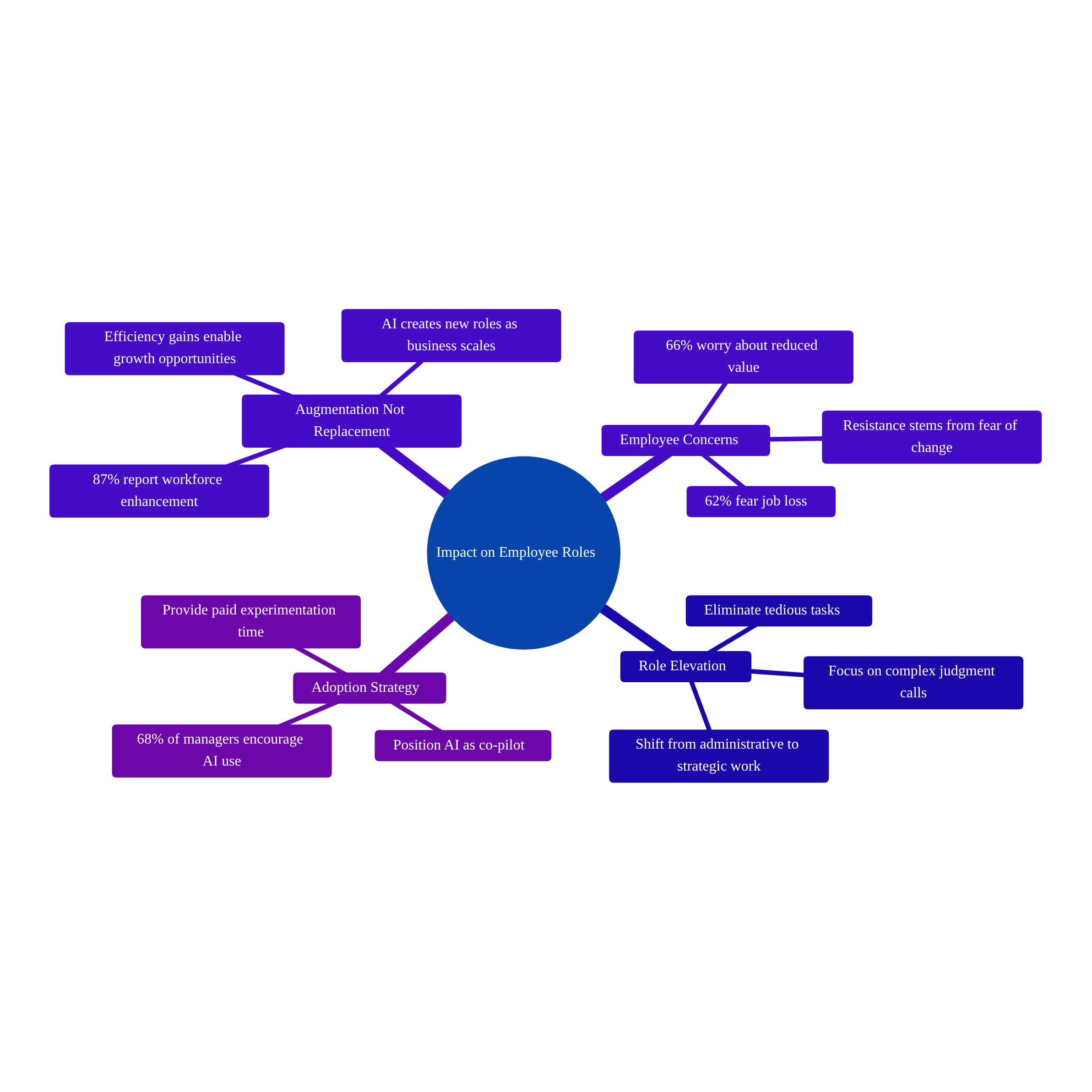
Automation primarily augments employee roles rather than replaces them, with 87% of AI-adopting businesses reporting workforce enhancement. Automation eliminates tedious tasks like data entry and repetitive emails, elevating employees from administrative to strategic work. Growing businesses using automation often increase hiring as efficiency gains create new roles and enable scaling opportunities.
Getting Your Team to Actually Use the Tools
This is where most automation initiatives die. You can have the perfect tool addressing the exact right problem, but if your team refuses to use it, you’ve accomplished nothing.
The resistance usually comes from fear. A 2024 survey found that 62% of employees fear AI tools will eventually cost them their jobs, and 66% worry that AI will make them less valuable at work. These aren’t irrational concerns—they’re predictable human reactions to change.
Here’s the reality that counters those fears: surveys show a positive correlation between AI adoption and hiring. Growing businesses that adopt AI often increase their workforce because the efficiency and growth driven by AI create new roles and allow the business to scale. Among businesses using AI, 87% report that the technology augments their existing workforce rather than displacing employees. But your team won’t know that unless you tell them explicitly.
Position AI as a co-pilot designed to eliminate the tedious work they hate—data entry, repetitive emails, administrative busywork. Frame it as elevating their roles from administrative to strategic. Your sales team stops spending hours on CRM updates and starts spending that time actually talking to prospects. Your customer service team stops answering the same five questions over and over and starts handling complex issues that require human judgment.
Provide dedicated, paid time for employees to experiment with the tools. Not “figure this out on your own time”—actual scheduled hours where they can test ChatGPT prompts for marketing or play with the new CRM automations without the pressure of their regular workload.
Sixty-eight percent of managers in 2024 reported actively encouraging their employees to use AI tools if it helps them perform their jobs better. That’s the right approach. Make it clear that learning these tools is part of their job, not an optional extra.
The employees who resist most strongly are often the ones who feel least confident in their technical skills. Among workers who feel confident they have the skills needed for the next three years, 70% believe AI will help them in their daily work. Building that confidence requires training and support, not just handing someone software and expecting them to figure it out.
One more thing: just over one-third of workers say their employers are providing the necessary training or guidance to use AI in their jobs. Don’t be part of that statistic. If you’re implementing automation, you’re responsible for teaching your team how to use it effectively.
How Do We Integrate AI Tools Into Our Existing Standard Operating Procedures?
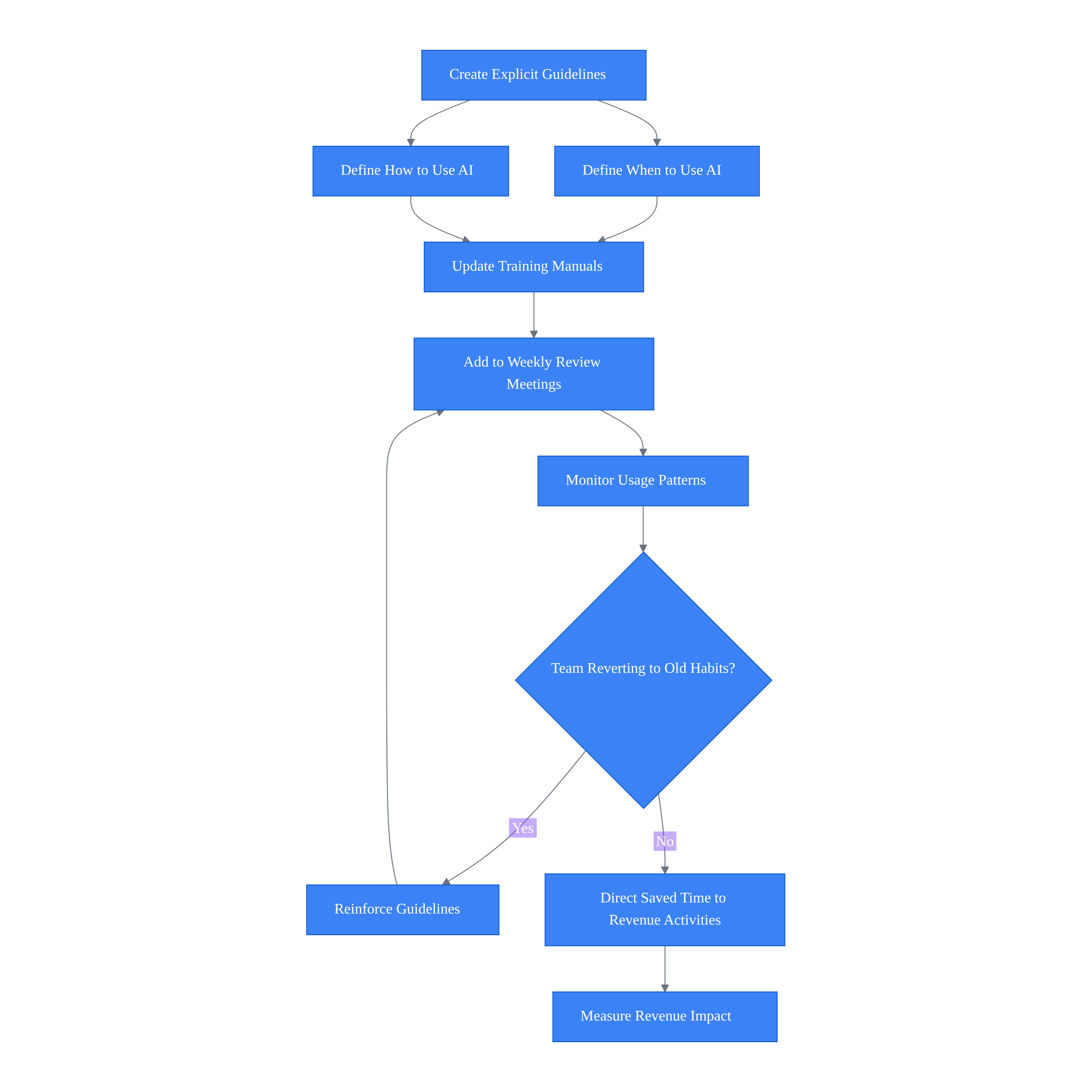
Businesses should create explicit guidelines specifying when and how to use AI tools, such as routing customer inquiries through chatbots first or using AI for content drafts. Integration requires updating official training manuals, incorporating AI usage into weekly review meetings, and establishing it as standard practice rather than optional. This prevents teams from reverting to old habits after initial adoption.
Making It Part of Your Standard Operating Procedures
Once you’ve piloted successfully and your team is on board, you need to embed the AI tools into your actual workflows. Not as an optional enhancement—as the standard way of doing things.
Create clear guidelines detailing exactly when and how to use the software. “All initial customer inquiries route through the AI chatbot before a human responds.” “All blog outlines are drafted using AI content generators first, then refined by the marketing team.” “All sales leads are automatically scored by the AI system, and the sales team focuses on leads rated 7 or higher.”
What you’ll notice: AI usage becomes habitual. Marketing campaigns launch faster because the initial content drafts are already done. Customer support tickets resolve quicker because the chatbot handles the simple stuff immediately. The general reduction in administrative bottlenecks means your team has more capacity for revenue-generating work.
The common failure mode here is reversion. Teams get excited during the pilot, use the tools religiously for a few weeks, then gradually slip back into old habits. To prevent this, integrate the use of workflow automation software into your official training manuals and weekly review meetings. Make it a standing agenda item: “How are we using automation this week? What’s working? What needs adjustment?”
Ninety percent of small businesses that use AI report that it has made their operations more efficient. But that efficiency only translates to revenue growth if you’re actively directing the saved time toward revenue-generating activities. If your team is saving five hours a week on administrative work but filling that time with more administrative work, you haven’t actually accomplished anything.
How Can I Effectively Measure the Real Impact and ROI of My AI Initiatives?
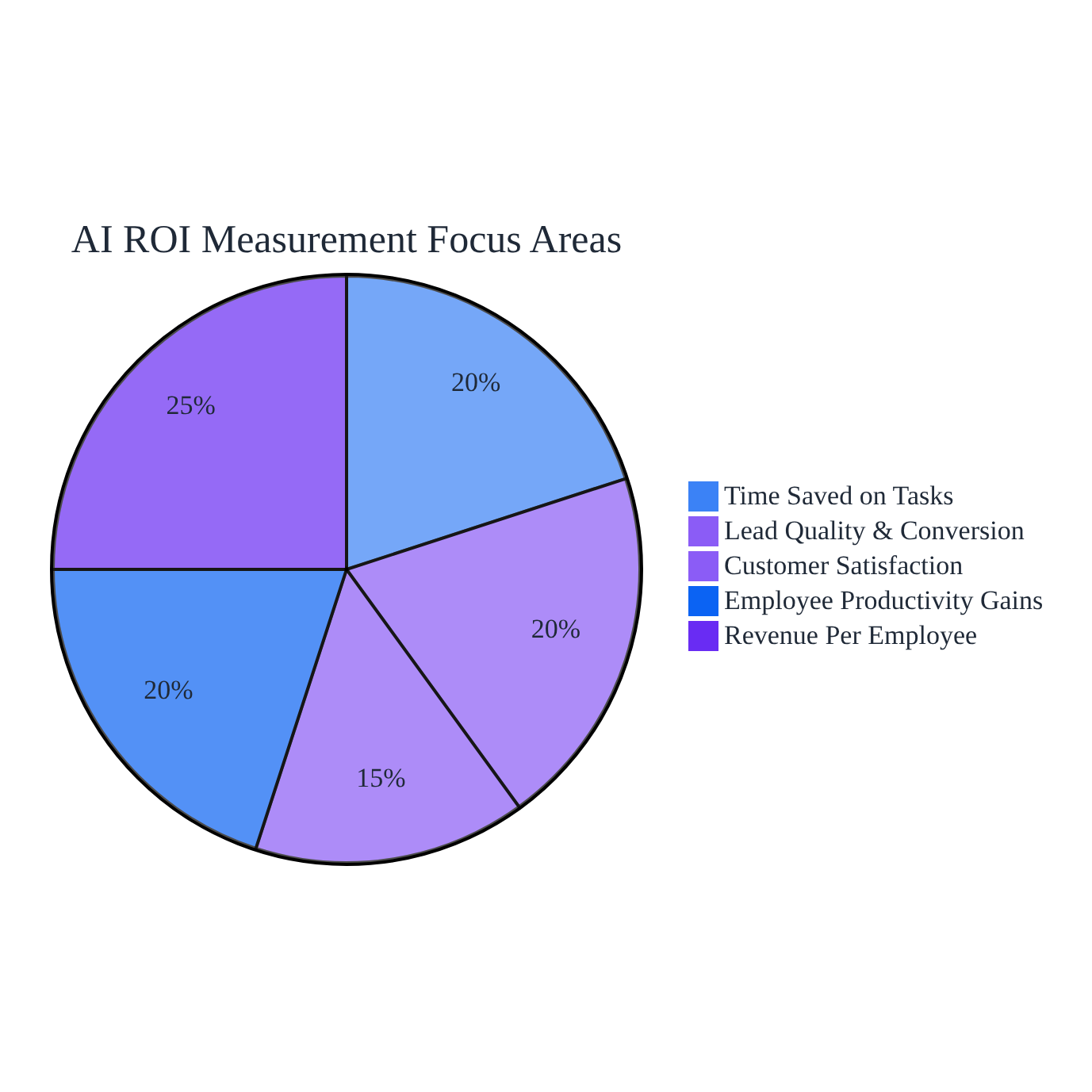
Measure AI ROI by tracking time saved on specific tasks, lead generation quality, customer satisfaction scores, and employee productivity gains. The ultimate metric is revenue per employee, which should increase significantly over 6-12 months as automation enables teams to handle more volume without adding headcount while redirecting saved time toward higher-value activities.
Measuring What Actually Matters
You need hard data to validate your investment and justify scaling your AI initiatives. Track specific operational efficiency KPIs and compare them to your baseline.
Time saved on specific tasks is the most straightforward metric. If your team was spending ten hours a week on data entry and now spends three, that’s seven hours of capacity you’ve created. But don’t stop there—track what they’re doing with those seven hours. Are they making more sales calls? Developing new client relationships? Creating higher-quality work?
Lead generation volume and quality. If you’ve automated lead scoring, measure whether your sales team is closing deals faster because they’re focusing on better-qualified prospects. While results vary significantly based on industry and implementation, AI-powered lead generation tools can substantially improve lead qualification when properly configured.
Customer satisfaction scores. If you’ve automated customer service, are response times faster? Are customers getting better answers? Eighty-two percent of consumers expect a response from a business within 10 minutes—a standard that’s nearly impossible to meet without automation.
Employee productivity metrics. Studies from institutions like MIT and Stanford have shown significant productivity gains from generative AI, sometimes ranging from 14% to over 50% for specific tasks. A 2024 report from the National Bureau of Economic Research found that generative AI could save employees up to 5.4% of their work hours, with surveys indicating that around 20-25% of professionals using generative AI were saving several hours per week. Are you seeing similar gains?
Revenue per employee is the ultimate metric. If you’re implementing automation correctly, this number should increase significantly over 6-12 months. You’re not adding headcount, but you’re handling more volume, closing more deals, or delivering more projects.
Here’s what you’re not tracking: vanity metrics that don’t influence the bottom line. “We generated 500 AI prompts this month” means nothing. “We closed 20% more deals because our sales team had time to make 30% more outbound calls” means everything.
If you cannot draw a straight line between the metric you’re tracking and actual revenue impact, reevaluate your KPIs. Measure outcomes (deals closed, customers served, projects delivered) rather than just outputs (AI prompts generated, emails sent, reports created).
Scaling Beyond the Pilot
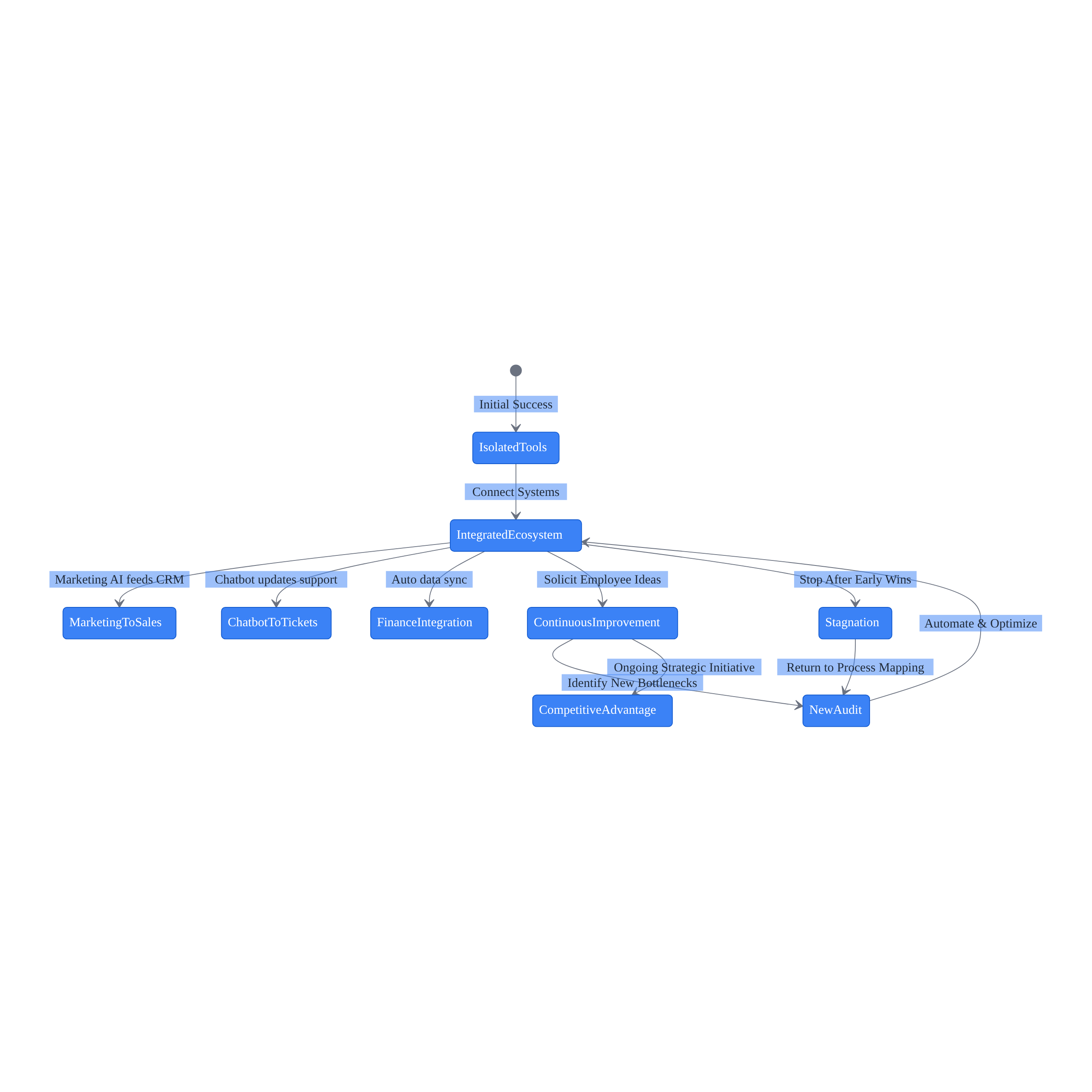
Once your initial automation is successful and generating positive returns, you’re ready to expand. This is where you move from isolated tools to a cohesive automated ecosystem.
Look for ways to connect disparate systems. Your marketing AI should feed directly into your sales CRM. Your customer service chatbot should update your support ticket system automatically. Your financial software should pull data from your sales platform without manual exports and imports.
Market analysis firms like Gartner predict a rapid increase in the integration of task-specific AI agents into enterprise applications over the next few years. The businesses achieving substantial revenue increases per employee are the ones building these integrated systems, not just using standalone tools.
Stay informed on emerging AI trends. Seventy-one percent of small businesses plan to increase their investment in AI over the next year. The technology is evolving rapidly, and what was cutting-edge six months ago might be standard practice now.
Solicit business automation ideas from your frontline employees. They’re the ones using the tools daily. They know which processes still have friction and where additional automation would help. While large enterprises report that 88% of organizations regularly use AI in at least one business function—expanding from sales and marketing into customer support (50%), finance management (44%), and product engineering (35%)—small and medium-sized businesses are still in earlier stages of adoption but following similar patterns.
The mistake at this stage is stagnating after early success. If your growth plateaus, return to your initial process mapping and conduct a new audit. Your business has changed since you first implemented automation. New bottlenecks have emerged. Find them and automate them.
Continuous optimization is the only way to maintain a competitive advantage. The global workflow automation market was valued at $26.5 billion in 2024 and is projected to exceed $78 billion by 2030. That growth is being driven by businesses that treat automation as an ongoing strategic initiative, not a one-time implementation.
What Are the Common Reasons Automation Fails in a Business Setting?
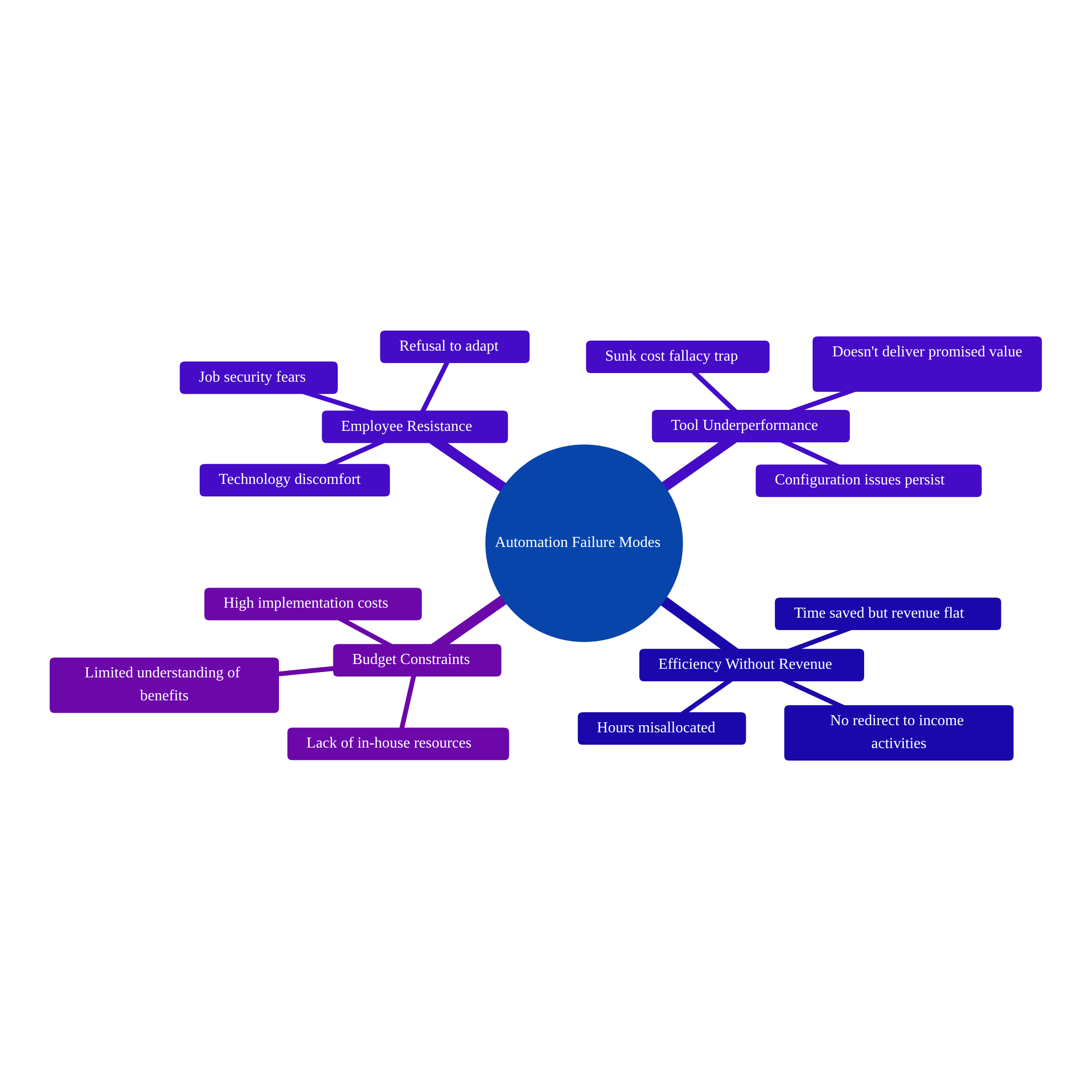
Automation commonly fails due to employee resistance rooted in job security fears, software tools that underperform despite proper setup, efficiency gains that don’t translate to revenue because saved time isn’t redirected to income-generating activities, and budget constraints that prevent implementation. Additionally, lack of understanding about automation benefits and insufficient in-house resources create significant adoption barriers.
When Automation Doesn’t Work
Let’s be honest about the failure modes, because they’re common enough that you need to plan for them.
Employee resistance that you can’t overcome. Despite your best efforts at transparent communication and training, some team members will refuse to adapt. This is usually driven by deep-seated fear of job loss or a fundamental discomfort with technology. You have two options: invest significant time in one-on-one coaching and support, or accept that this person might not be the right fit for where your business is headed.
Tools that underperform despite proper configuration. Sometimes the software just doesn’t do what it promised. If you’ve followed the documentation, refined your inputs, and ensured integrations are properly set up, and it’s still not delivering value—pivot to an alternative solution. Don’t fall victim to sunk cost fallacy.
Efficiency gains that don’t translate to revenue growth. This is the most insidious failure because it looks like success on the surface. Your team is saving time, processes are faster, but revenue is flat. The problem is usually that the saved time is being misallocated. Ensure that hours freed up by automation are actively redirected into revenue-generating activities—proactive client outreach, new marketing campaigns, product development—rather than just filling the time with more administrative work.
Budget constraints that make implementation impossible. High implementation costs are a significant barrier for smaller organizations. The solution is to start with affordable, high-impact AI solutions and expand as revenue increases. Prioritize free tools, open-source models, or entry-level tiers of established platforms. Focus strictly on tools that offer the highest immediate ROI for your most critical bottlenecks before upgrading to premium subscriptions.
The primary barriers to AI adoption for small businesses are lack of understanding about its benefits (62%) and lack of in-house resources (60%). If you’re struggling with either of these, you might need outside help. Only 14% of small businesses are fully integrating AI into their core operations, which means most companies are still in the early stages and have significant room to scale—but also that they need guidance to get there.
What’s the Actual State of AI Adoption for Small to Midsize Businesses in 2026?
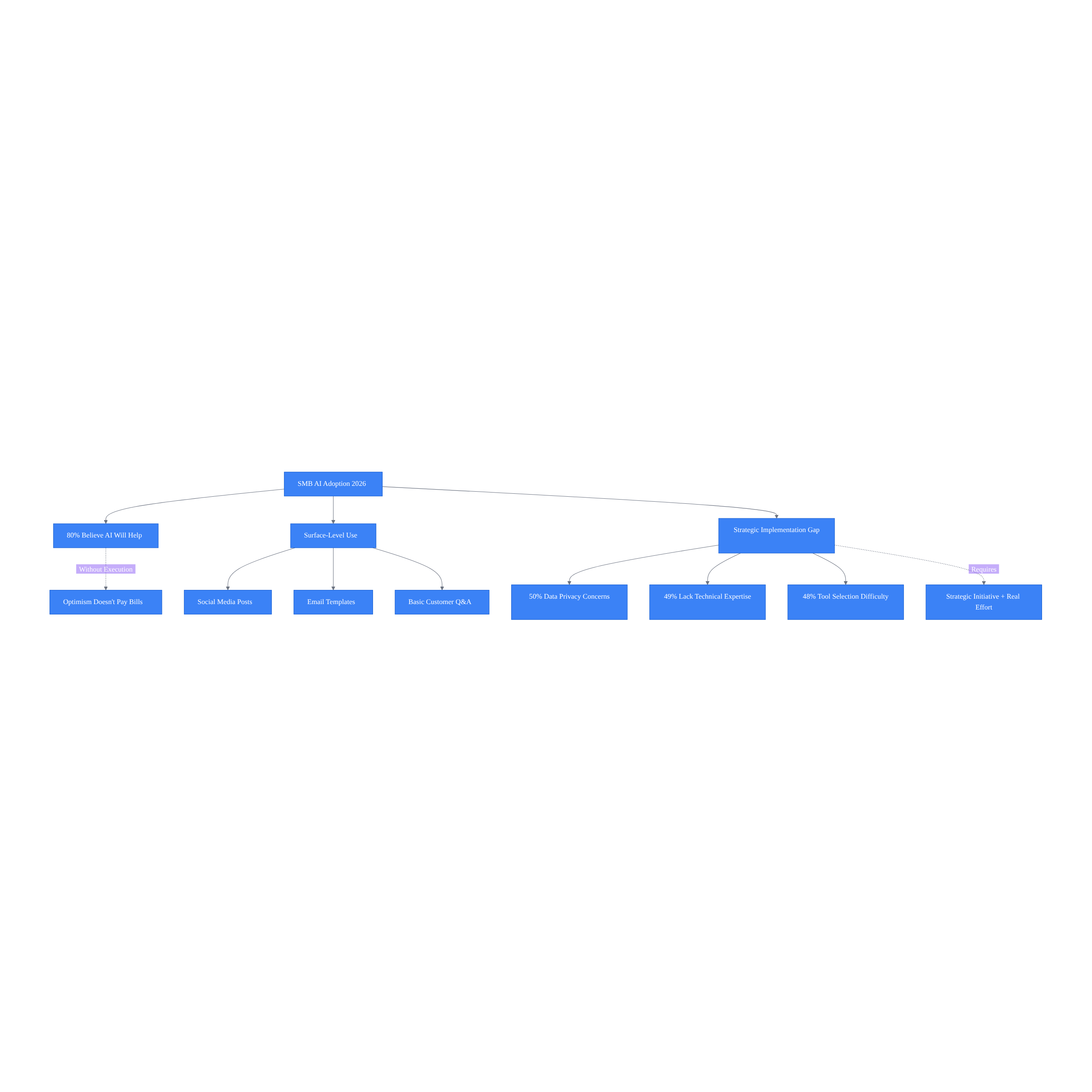
AI adoption among small to midsize businesses has more than doubled recently, with 80% of owners believing it will benefit their operations. However, most implementations remain surface-level—social media posts and email templates—rather than strategic. Key challenges include data privacy concerns (50%), lack of technical expertise (49%), and difficulty selecting appropriate tools (48%).
The Reality of AI Adoption in 2026
AI adoption among small to midsize businesses in the U.S. is growing rapidly, with usage rates that have more than doubled in recent years. Data from early 2024 indicates that generative AI adoption among small businesses was growing explosively, with some reports showing usage doubling year-over-year. But there’s a massive gap between basic adoption and strategic implementation.
Most businesses are using AI for surface-level tasks—drafting social media posts, answering basic customer questions, generating email templates. Those are fine starting points, but they’re not going to drive substantial revenue growth per employee. That kind of lift comes from systematically identifying your operational bottlenecks, matching the right automation tools to those specific problems, securing genuine team buy-in, and continuously optimizing your processes based on measured results.
Eighty percent of small business owners believe AI will help their business in the future—a 20-point increase from the previous year. The optimism is justified. AI adoption is growing at a rate far ahead of personal computers and the early commercial internet at similar points in their rollouts. In the next few years, AI is expected to become a baseline for business operations, not just a competitive advantage.
But optimism without execution doesn’t pay the bills. The businesses that will thrive are the ones treating this as a strategic initiative requiring real effort, not the ones hoping that subscribing to a few AI tools will magically solve their problems.
These aren’t insurmountable obstacles, but they’re real. If you’re serious about growing revenue per employee without adding headcount, you need to address them systematically. That might mean investing in better data management practices. It might mean bringing in outside expertise to handle the technical implementation. It might mean dedicating more time to training your team than you initially planned.
The alternative is joining the high percentage of technology implementation projects that struggle—primarily due to skill gaps and lack of organizational readiness rather than technology limitations. It’s widely accepted in the IT and business management fields that most automation initiatives fail to meet their objectives, with the primary reasons being people and processes—such as lack of employee buy-in, inadequate training, and poor change management—rather than failures of the technology itself.
What Are the Key Lessons Learned From Implementing Automation Solutions for Businesses?
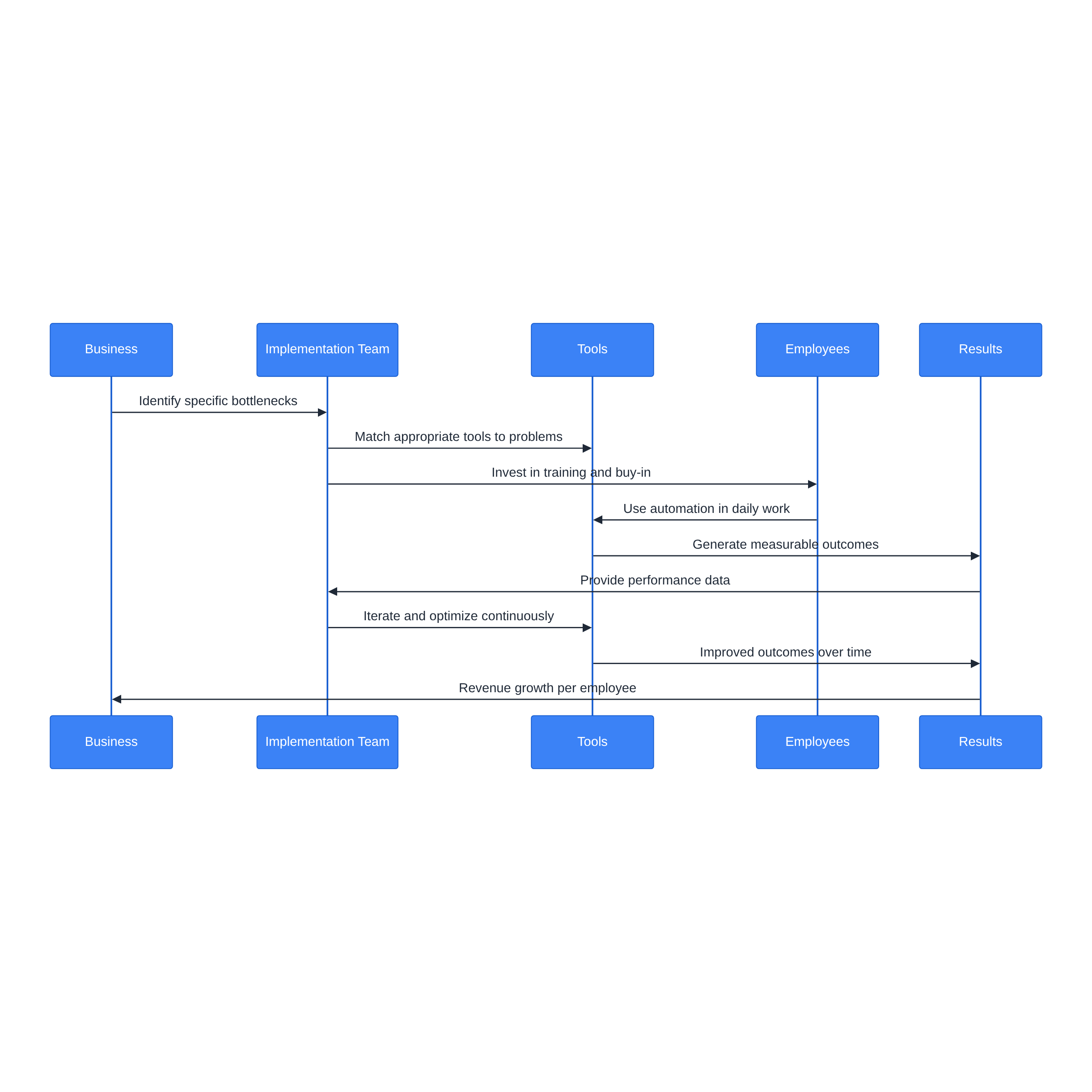
Successful automation implementation requires identifying specific bottlenecks, matching appropriate tools, investing in team training and buy-in, measuring results rigorously, and iterating continuously. Companies must treat automation as a strategic initiative with dedicated resources rather than a side project, committing to continuous optimization instead of expecting one-time solutions to deliver instant results.
What We’ve Learned Building These Systems
We’ve implemented automation solutions for hundreds of businesses since 2022. The pattern is consistent: companies that succeed follow a methodical process. They identify specific bottlenecks. They match appropriate tools to those bottlenecks. They invest real time in team training and buy-in. They measure results rigorously. They iterate continuously.
The companies that fail skip steps or expect instant results without putting in the work.
The good news: the technology is better and more accessible than it’s ever been. Recent data shows generative AI adoption among U.S. small businesses has grown from 23% in 2023 to significantly higher rates in subsequent years. The barriers to entry are lower, the tools are more user-friendly, and the proven use cases are well-documented.
The challenge: most businesses are still in the early stages of adoption. Only 14% are fully integrating AI into their core operations. The gap between basic adoption and strategic implementation is where the real opportunity lies.
If you’re serious about growing revenue per employee without hiring, you need to treat business process automation as a strategic initiative, not a side project. That means dedicating real resources—time, budget, and leadership attention—to doing it right. It means being honest about the challenges and willing to work through them. And it means committing to continuous optimization rather than expecting a one-time implementation to solve everything.
The businesses achieving substantial revenue increases per employee aren’t doing anything magical. They’re just doing the work systematically and sticking with it long enough to see results.
Article Citations:
- U.S. Chamber of Commerce – Empowering Small Business Report (2025)
- Service Direct – 2025 Small Business AI Report
- SBA Office of Advocacy – AI In Business: Small Firms Closing In (2025)
- St. Louis Fed – The Impact of Generative AI on Work Productivity (2025)
- Automation Anywhere – Global Research on ‘Most Hated’ Office Tasks (2020)
- Pew Research Center – U.S. Workers’ Views on AI in the Workplace (2025)
- Goldman Sachs 10,000 Small Businesses Voices – Survey: Small Businesses Embrace AI (2026)